Policies Governing Academic Integrity
Please review Penn's Code of Academic Integrity, which guides our course.
CIS 1100 is a challenging course that requires a substantial amount of time for most students. Many of you are learning a new kind of abstraction (algorithmic thinking), a new way to express procedures (programming), and a new level of discipline in thought (precision and rigor). Working through the assignments, encountering errors and bugs, and finding the solutions yourself are absolutely essential to learning these skills. To this end, CIS 1100 institutes and enforces a strict collaboration policy to ensure that all students are learning effectively. Suspected violations of this policy are systematically referred to the Office of Student Conduct, and generally incur both a disciplinary sanction and a grade deduction.
This semester, we will be providing many hours of support per week. We urge students to take advantage of all of the tools available (Office Hours, Recitation, or reaching out for additional support if needed) so that the incentive to violate collaboration policies remains as low as possible.
On the homework assignments, we use automated "cheat-checking" software to help detect plagiarism and inappropriate collaboration.
Collaboration Policy
Different assignments in this course have different requirements about how you complete the work. In all cases, the work that you submit must represent your own individual effort.
Exams and Homework Presentations
- You may not look at, access, or acquire a copy of anyone else's work. When homework presentations are done in groups, you may not access any other group's work.
- Until grades for the exam/presentation are released, you may not discuss the contents or your solutions. You may not show your work to anyone except current CIS 1100 Professors and TAs. You may not post any portion of your assignment online. This applies even after the course ends.
- You may not consult web resources, ask questions online, or use LLM/AI resources like ChatGPT, Claude.ai, Copilot, and all other similar tools.
- Don't be clever about this policy. Instead, if you're unsure whether something is appropriate, come by the instructor's office hours and ask.
Homework Projects and Practice; Recitation Work
- You may discuss solutions with classmates. However, you must not acquire a copy of anyone else's work and submit it as yours, and you must not (re)write your solution with reference to another solution you find and then submit it as your own.
- Although it is generally not advisable, you may consult web resources, ask questions online, or use LLM/AI resources to help you complete the project. You must not use or copy from a solution that you find online or that has been generated by an LLM/AI. There are more details on this below.
Guidelines for the Use of Generative AI in this Course
We recognize the increasing prevalence and power of Artificial Intelligence (AI) tools, and encourage their responsible and ethical use to enhance your learning experience. However, it's essential to develop a strong understanding of fundamental processes before relying on AI. To that end, we provide some examples where AI tools are acceptable and unacceptable.
Examples of acceptable uses of AI:
- Comprehension and Expansion: It is acceptable to use AI to clarify and expand your understanding of lecture notes, slides, and provided code examples.
- Error messages in Python are confusing, so you are welcome to use AI to help you understand what they mean.
- Research and Information Gathering: AI can supplement your research and information gathering, aiding your exploration of complex concepts.
Examples of unacceptable uses of AI:
- Assignment Completion: You may not use AI for generating code or text for assignments. This includes written responses to README questions.
- Avoid pasting more than a line or two of your own code at a time so that AI is only able to reveal a limited amount of the solution to you at once.
- Pasting the assignment instructions into AI directly is forbidden.
- Academic Integrity: Do not present AI-generated content without citation and as your own work.
- If you ask generative AI a question about a topic and it teaches you a new Python function/technique, you should make sure to cite the AI when you use that code in this class.
Engaging in unacceptable use of AI tools will result in academic consequences, which may include grade penalties, academic warnings, or other actions.
Note that these guidelines may differ from those in other courses.
An Example of Constructive AI Use
Here is an example of you can use AI to help you complete your assignment without violating any integrity policies. We don't recommend defaulting to this in every case for a couple of reasons: sometimes it's good to sit and think for a while on your own, and a TA, instructor, or even a classmate might be able to answer the question in a way that helps you get to the answer more independently instead of just leaping right to a fix that you might not understand.
In Homework 4, Mariana is asked to write a short program that counts the number of lines that start with a certain word in a file. She thinks for a while and starts to write out a partial solution:
f = "filename.txt"
count = 0
for line in f.readlines():
  if f[0:3] == "YES":
    count += 1
  else:
    # ???
Mariana knows that this isn't the full solution, but she's getting an error when she runs this solution that she's having trouble reading:
AttributeError: 'str' object has no attribute 'readlines'Mariana pastes the error message into Google Search directly and the Gemini (AI) answer at the top looks like this:
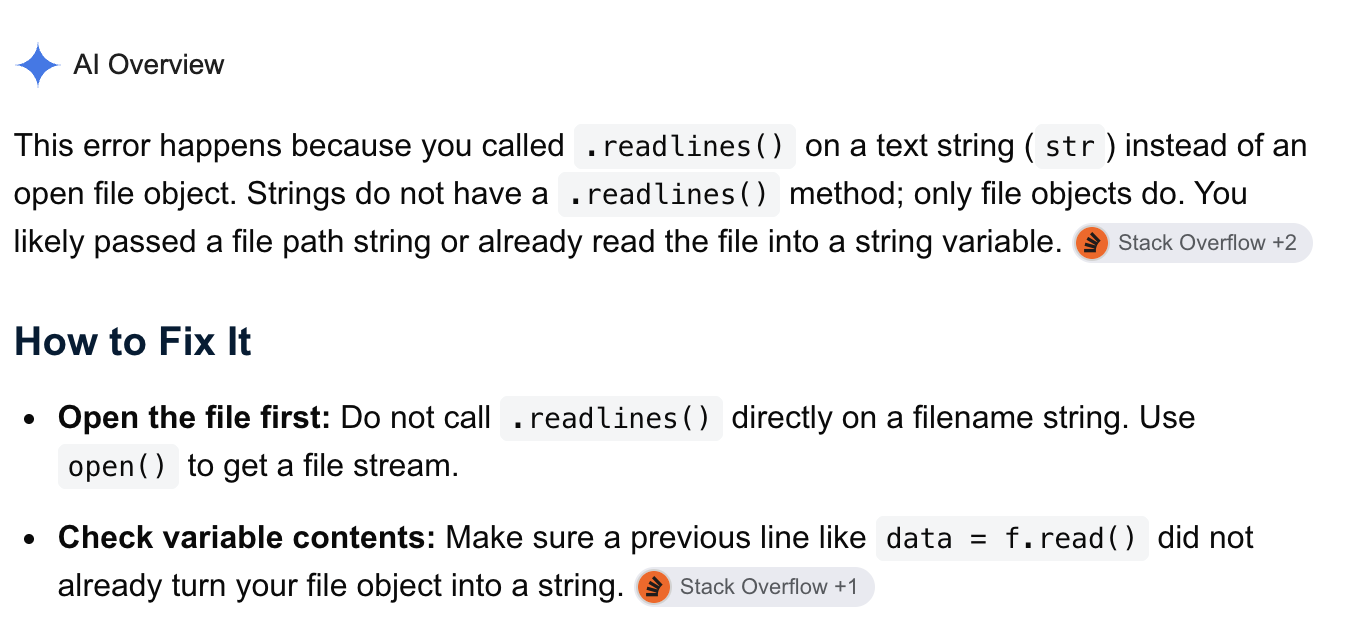
She realizes that yes, she did forget to open up the file for reading. She doesn't remember how to do that, but she knows that we covered it recently in class, so she reviews the slides and her notes and figures out that she's missing a call to open().
Upon fixing this bug, she gets another syntax error—but she'll spend some time thinking about this in order to solve it on her own.
An Example of Unacceptable AI Use
In Homework 4, Mariana is asked to write a short program that counts the number of lines that start with a certain word in a file. She thinks for a while and starts to write out a partial solution:
f = "filename.txt"
count = 0
for line in f.readlines():
  if f[0:3] == "YES":
    count += 1
  else:
    # ???
She posts the following prompt into an LLM of her choosing, like PennChat:
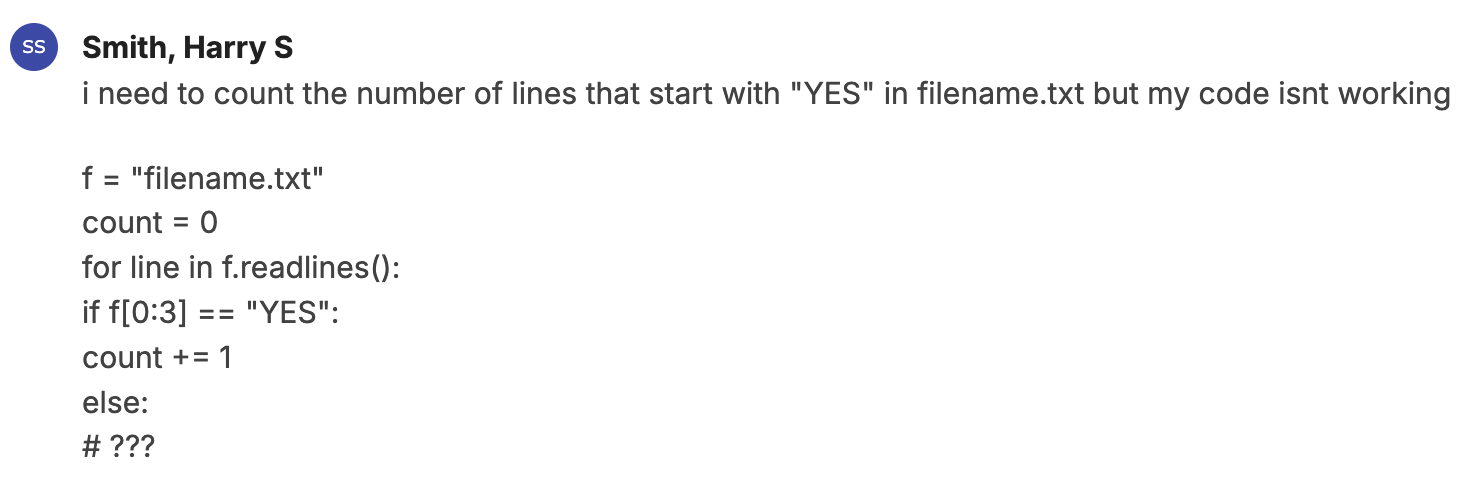
She gets the following response that contains not only a fix for the current bug, but also a fix for all of the other bugs present in the program:
## Bug Analysis

Your code has **two bugs** and a misunderstanding about the `else` block:

---

### Bug 1 — `f` is a string, not a file object
You assigned `f = "filename.txt"` (just the filename as text). You need to **open** the file first before you can call `.readlines()` on it.

### Bug 2 — Checking `f` instead of `line`
Inside the loop, `if f[0:3] == "YES"` checks the *filename string* `"filename.txt"`, not the current line. You need to check `line` instead.

### The `else` block
You don't need one! If the line doesn't start with `"YES"`, you simply do nothing and move on.

---

### ✅ Fixed Code

count = 0

with open("filename.txt", "r") as f:   # Bug 1 fix: properly open the file
    for line in f.readlines():
        if line[0:3] == "YES":          # Bug 2 fix: check `line`, not `f`
            count += 1
        # No else needed — just skip non-matching lines

print(count)


---

### 💡 Recommended Improvement

Instead of `line[0:3] == "YES"`, consider using **`line.startswith("YES")`** — it's more readable and handles edge cases (like lines shorter than 3 characters) more gracefully:

count = 0

with open("filename.txt", "r") as f:
    for line in f:                      # No need for .readlines(), iterating directly is fine
        if line.startswith("YES"):
            count += 1

print(count)


---

### Summary of Fixes

| # | Problem | Fix |
|---|---------|-----|
| 1 | `f` was a plain string, not a file object | Use `open("filename.txt", "r")` |
| 2 | Checked `f[0:3]` (the filename) instead of the line | Change to `line.startswith("YES")` |
| 3 | Unnecessary `else` block | Remove it — no action needed for non-matching lines |
Mariana takes the "Fixed Code" and runs it: it works, and she submits it as her own. She does not have the opportunity to recognize the dangling else clause as a bug in its own right and she has incorporated an additional python built-in function .startswith() that she doesn't know how to use and that we didn't cover in the course.
She can't explain the use of the function in her Homework Presentation, and so she loses points. Because the function is not cited properly, she couldn't explain how it works, and we didn't cover it in class, she is referred to the Center for Community Standards and Accountability for plagiarism. Finally, when the exam contains a coding question with a similar problem, she can't write the solution for herself, and she earns 0 credit for that question.
Penalties for Violation of These Policies
The role of the CIS 1100 course staff is to educate students about Computer Science. The following penalties are designed to disincentivize plagiarism and improper collaboration. The basic principle is that you will not receive credit for work that you did not individually generate.
The staff is not invested in or responsible for investigations of the cases beyond the details that we first detect. Neither are the instructors interested in notions of punitive justice. To that end, CIS 1100 leans heavily on the Office of Student Conduct for contested or repeated cases. You can learn more about their processes, and their emphasis on restorative practices on their website.
-
At the first detected case, the student will receive at least a 50% grade deduction on the assignment in question. If the student contests the case, then the case is automatically referred to the Office of Student Conduct for investigation and determination.
-
For every subsequent violation, the student will receieve a grade of 0% on the assignment in question. The instructors will automatically refer the case to the Office of Student Conduct as well.
As instructors, we make no guarantees about the timeline for discovering and notifying the student about violations. As a result, we may notify students of a first and a second violation at the same time. Additionally, we reserve the right to apply harsher penalties for first violations in egregious cases (direct letter-for-letter plagiarism, stealing another student's laptop, etc.).
Collaboration Policy (Annotated)
This annotated version of the policy includes many examples and elaborations to help you understand how to interpret the rules. It covers many situations that have come up in past semesters, but it is not exhaustive.
- You may not look at, access, or acquire a copy of anyone else's work. There are certain exceptions as provided in the "Appropriate Collaboration" section.
- You should think carefully about the assignment, and your work should be completely the product of your own understanding.
- You may not look at another student's code "for reference," then put it aside and write your program, even if the other student is not currently or never was in CIS 1100.
- You may not look at code posted to online forums by people asking questions or providing answers (more on this below).
- You may not use another person's solution to the problem in the assignment, even if it is not based on the actual assignment or is in a different programming language (e.g. you may not look at a C++ or OCaml implementation of an assignment to help you with your own Java version for CIS 1100).
- You may not let someone else (even someone who has never taken CIS 1100) explain a solution to you in so much detail that they are effectively dictating the code to you line by line, whether or not that person is looking at his or her code while doing so. If the similarity of your code to the person's who helped you is much higher than the similarity between random pairs of submissions, we must treat the case as one of inappropriate access to someone else's work.
Constructive Collaboration without AI
The collaboration policy sounds scary because we take it very seriously. But it is not meant to prohibit all discussion and collaboration. It is intended to limit only the forms of collaboration that undermine the learning goals of the course. Here are some ways that we encourage you to work together and to get help:
- Come to office hours early and often! CIS 1100 is designed for you to learn as much as possible with the benefit of help. We want you to get stuck, ask questions, and learn how to experiment and find solutions. We also want you to learn more by taking advantage of office hours than you would be able to learn on your own.
- Read through each assignment with one or two friends, and work out together what the different steps are; what you need to make sure you understand; and where to find the information you need in the assignment writeup, course web site, and textbook. Document in your readme who you discussed with, and what you concluded.
- Work through course notes and example code together. Work together on example programs that are not part of the assignment to understand different concepts. For example, when you are preparing for the NBody assignment, we encourage you to work through the Bouncing Ball examples together, and modify it together to help understand animation and nested loop structures.
- Discuss together how to test your code, and what different kinds of input might cause problems. We don't always tell you everything that could go wrong in your program; figuring that out is part of your job, and doing this together will help you understand the assignment better prepare to start programming. Log your discussions before you forget the details.
- Search the CIS 1100 Ed for answers. When you have a question, it is likely someone else has asked it already. Only post your question if you can't find a discussion thread that helps you. Answer other students' questions on Ed, for instance by suggesting tests the other student can do to help detect and debug the issue in their code. You do not need to log the help you receive and provide on the CIS 1100 Ed in your readme.
- Compare output from your program and a friend's. As long as you do not look at each other's code, we strongly encourage comparing output as a way to test your program. If you do this, you must log exactly the help that you provide in the readme.